AI App Guides
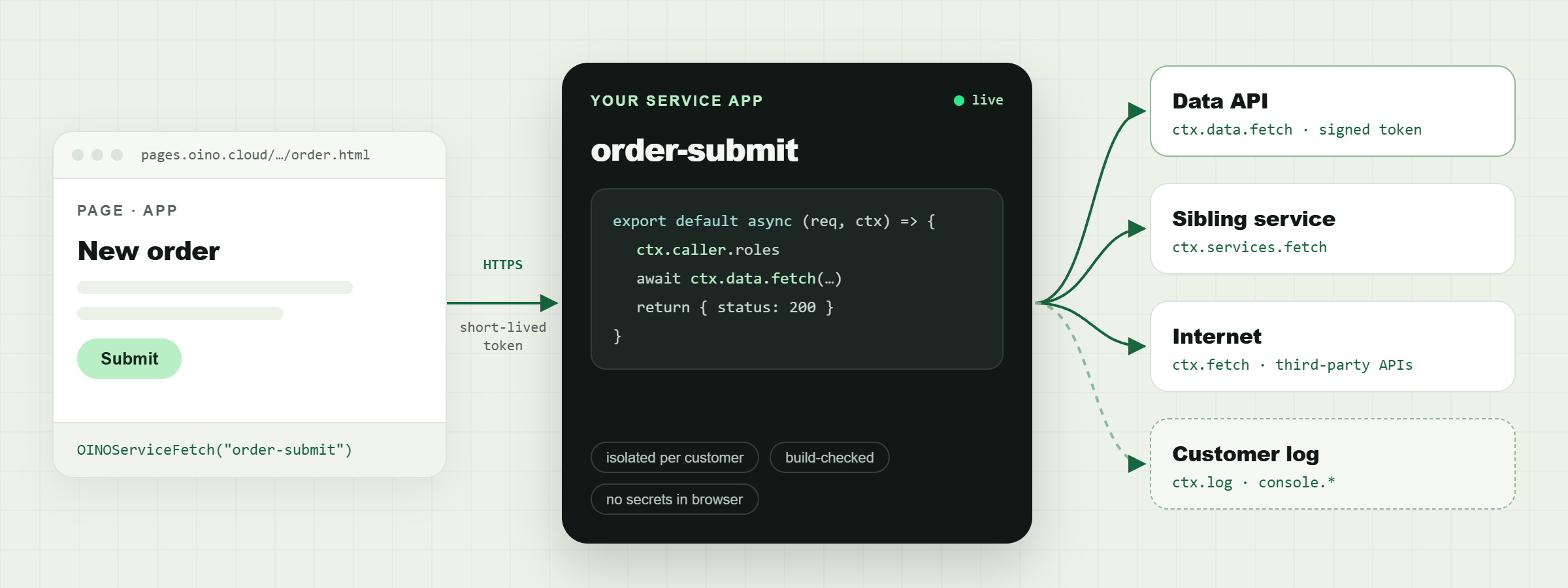
A service is a piece of server-side JavaScript that your pages, apps and other services call over HTTPS. Use one for logic that must not run in the browser: secrets, validation, multi-step data changes or calls to third-party APIs.
What a service is
A service is a single, dependency-free JavaScript module with one default-exported handler. Your AI assistant writes it and publishes it through the MCP server; OINO.cloud checks it, deploys it to your own service app and gives it a URL. Services never see your database credentials — everything they do goes through the platform.
export default async function handler(req, ctx) {
    // req: { method, path, query, headers, body }
    const res = await ctx.data.fetch("/api/v1/<customerId>/<token>")
    return { status: 200, body: { ok: true } }
}
A string body is sent as-is, anything else is returned as JSON. req.path is the part after /<serviceId>/.
What a service can use
Everything outside the handler's own logic goes through ctx:
- ctx.data.fetch: call your data APIs, signed as the service. The token must allow the service (see below).
- ctx.services.fetch: call a sibling service of yours.
- ctx.fetch: call the internet. Raw
fetchis not available. - ctx.log: write to your customer log. Plain
console.log/info/warn/erroris captured there too. - ctx.caller: the verified caller (
subject,roles,appId), ornullfor a public service.
Rules the build check enforces
The source is checked before anything is stored, and rejected with line and column errors if it breaks the contract:
- Only the default export; imports only from
node:crypto,node:buffer,node:url,node:utilandnode:querystring. - No dynamic
import(),eval,Function,require,process,globalThis/window, rawfetch/XMLHttpRequest/WebSocketor WebAssembly. - HTTP request/response only (no timers or queues), at most 200 KB of source.
Publishing a service
- Ask your AI assistant to publish the service with an id you choose (4-100 letters and hyphens, e.g.
order-submit). The id becomes part of its URL; publishing the same id again updates it in place. - Decide who may call it. An empty role list makes the service public; otherwise callers must sign in and hold one of the listed roles.
- The assistant polls the service list until the deployment is live. The first service takes a few minutes, later updates usually under a minute.
- Call the service at
https://<host>/<serviceId>/..., using the URL the list reports.
You can keep the source but take a service offline by publishing it as inactive. When the last service is removed, the service app is stopped.
Letting a service use your data
Publishing a service does not change your database. To let it read or write data, add one of its implicit roles to the token it should use:
urn:oinocloud:svc:<customerId>— any service of yours.urn:oinocloud:svc:<customerId>:<serviceId>— one specific service.
Follow the least-privilege advice from the Security guide: prefer the single-service form and a read-only token unless the service must write.
Calling services from pages and apps
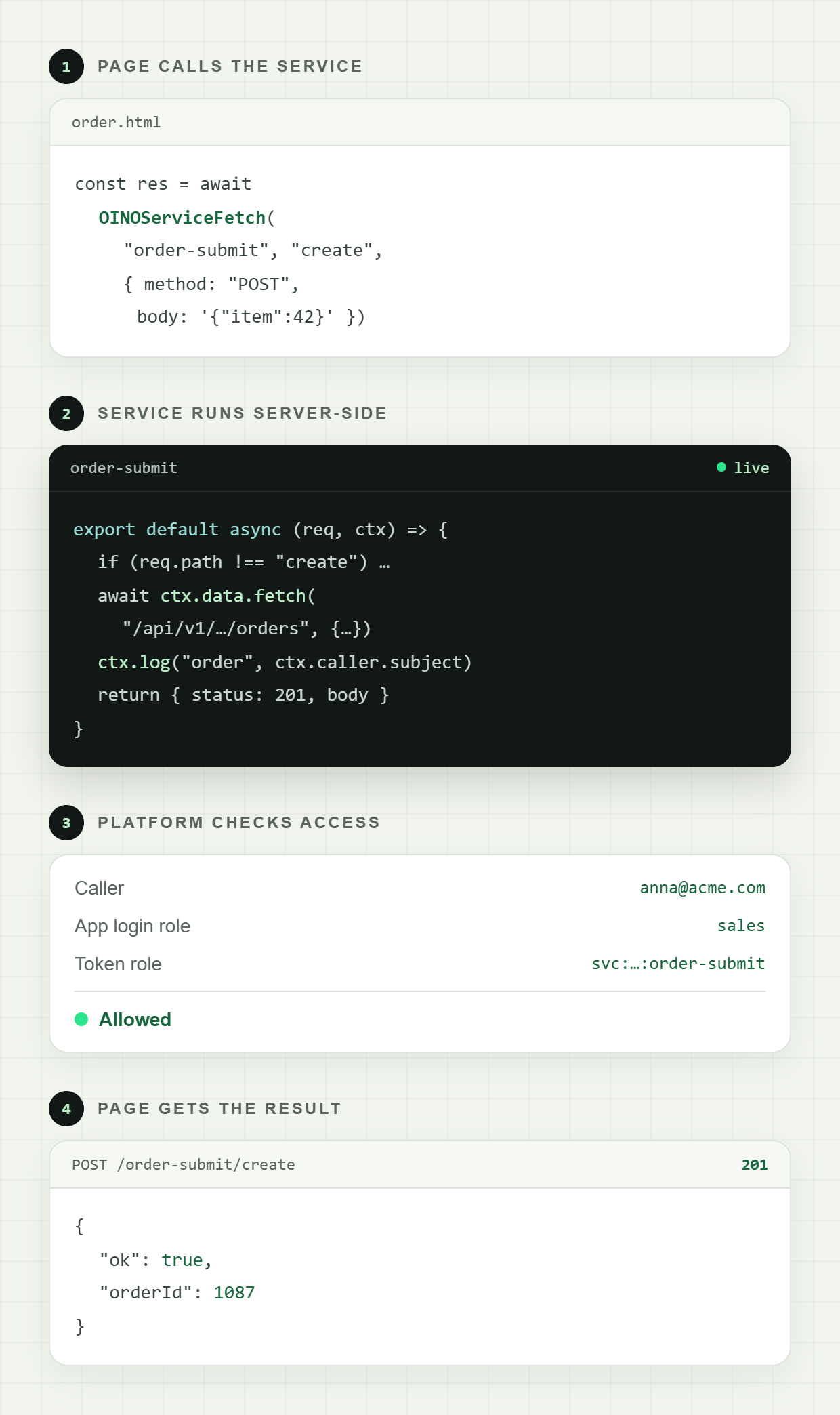
In a page, load the platform helper as a plain script and call the service like fetch():
<script src="/svc-client.js"></script>
<script type="module">
    const res = await OINOServiceFetch("order-submit", "create", {
        method: "POST",
        body: JSON.stringify({ item: 42 })
    })
</script>
OINOServiceFetch gets a short-lived token with the user's app login, caches it, re-requests it once if it expires, and also works for public services. Use await only inside an async function or a module script, and never hard-code the service host.
List every service a page calls when publishing the page. The service's roles then join the page's login roles, so everyone who can log in to the app is also allowed to call its services — otherwise a user may log in and still be refused by the service.
How access is secured
- Your services run in a service app of their own, separate from every other customer's.
- Access is decided by OINO.cloud when it issues a short-lived token; the service only verifies it. A role change takes effect within minutes.
- Service calls to your data APIs are signed per service. If a service key leaks, publish the service again with key rotation to revoke it.
- Treat a service as part of your own trust boundary: code you publish can do anything your data tokens allow it to.
Tip: keep each service small and single-purpose, and let pages do the presenting. That gives you narrow roles and tokens, and makes the AI's context easy to follow.
The full picture
A MCP server exposes one database through tokens, roles control access, pages present the data, apps put pages behind one login — and services add the server-side logic in between.