Your database.
Your agents.
Connected.
Turn your database into a platform for AI agents and apps. REST APIs, MCP, and secure access — ready to use, without writing code or setting up servers.
Works with the agentic AI solution your team already uses.
Everything for
unleashing your data
OINO.cloud handles logins, security, pages and integrations, so your team can put data to work without a development project.
AI Ready Data Platform
OINO.cloud automatically creates a REST API and MCP-server from your database schema without setting up any infrastructure. No more costly and time-consuming integaration projects just to make your data accessible.
See how it works →Agentic Devops
OINO.cloud MCP server is a sandbox of one database for your agents to manage schema and create APIs, web pages and authenticated apps, enabling a fully autonomous agentic development process.
See example →Authorized Data Access
Define tokens with neccessary CRUD-right and optionally OAuth or enterprise SSO based per user access control, enabling no code authenticated apps.
Read guide →Live Data Everywhere
Instead of trying to sync stale data between platforms, publish always-up-to-date tables, lists and reports in any website or portal just by creating a template to convert data to HTML in real time. Or use a CSV-link with any Business Intelligence platform for on demand update of data.
See example →Universal Data Plane
OINO.cloud provides a centralized, standard platform for accessing data from diverse data sources. Instead of databases open to internet or dozens of point-to-point integrations, OINO.cloud is your single point of fully featured data access.
See example →Own Your Data
In the AI age, owning your data is crucial for maintaining control, privacy, and compliance. Code and compute can be easily recreated and migrated as long as data ownership is maintained.
See example → Privacy & GDPR →Build apps on your data with your own AI agent
Connect your AI assistant to an OINO.cloud MCP server and let it build on your own database: schema, secure REST APIs, pages and login-gated apps.
Read the AI app guides-
Connect database
Bring your own data.Connect your MariaDB / MySQL, PostgreSQL or SQL Server database and bind it to an MCP server your agent connects to.
OutputMCP server → -
Create data schema
Model your data with the agent.Let the agent create tables and columns. Every table automatically gets a secure REST data API and access tokens.
OutputTables & data APIs → -
Create pages
Build UI on live data.Ask the agent to generate HTML pages that read and write your data through the APIs, and publish them in one step.
OutputPublished pages → -
Define auth roles
Control who gets in.Require roles on tokens to protect data and put a shared login in front of your pages as an authenticated app.
OutputAuthenticated app →
Start free, scale as you grow
Start small and pay for what you need or scale your quotas for predictable costs.
- Traffic 2 GB/day
- MCP servers 1
- Release history 2
- SSO authentication —
- Traffic 10 GB/day
- MCP servers 2
- Release history 10
- SSO authentication —
- Traffic 50 GB/day
- MCP servers 5
- Release history 50
- SSO authentication —
- Traffic 100 GB/day
- MCP servers 10
- Release history 100
- SSO authentication ✓
Usage beyond the included quota
Same unit prices on Pilot, Production and Enterprise. You only pay for what exceeds your plan’s quota.
Describe it. Build it. Use your data.
LLMs understand REST APIs with query parameters and JSON output well. Just describe what you want to do with the Products API, AI can figure out how to use the API.
See it in action
All examples here use live out-of-the-box OINO.cloud APIs without any additional backend development. Just HTML and JS.
Live Data Table with Sorting
Simplest way to embed live data to a page is to fetch the API with library like HTMX, set header Accept: text/html and let OINO.cloud API render the page using a template.
| Product Name | Unit Price | Units In Stock | Units On Order |
|---|---|---|---|
Real-Time Chart
Fetch JSON data from the Orders API and render it with Chart.js — a stacked bar chart of freight costs by country and month.
Vote on Features
This form dynamically loads vote options from the database and submits your vote via a POST request — all without custom backend code.
Data Browser
As an example of AI development of data driven apps, this data browser was just high level requirements about using filters and sorting and paging. Even adding editing for tokens with update rights was no problem (check out your account page for that).
Excel, PowerBI & Dataverse
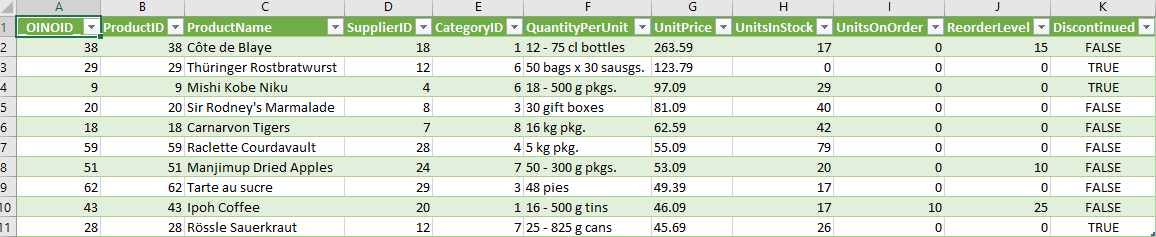
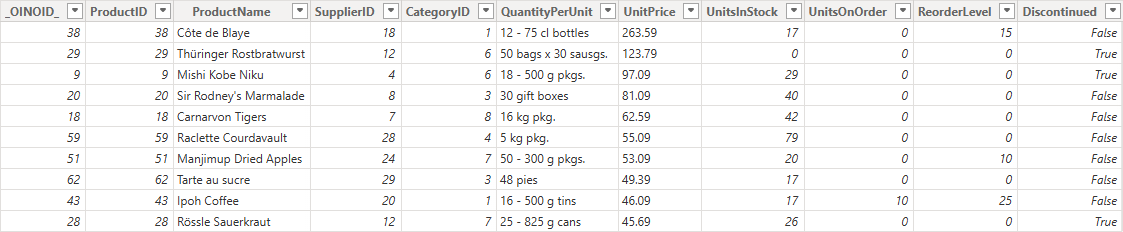
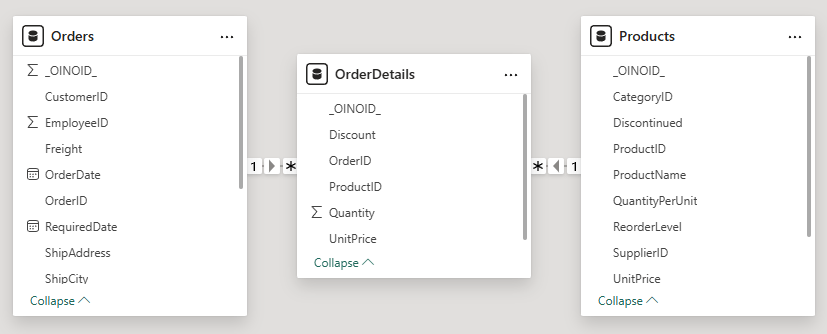
OINO.cloud CSV and JSON output plugs directly into typical web data import for analytics and BI tools.

A full REST API — nothing to build
Every table and view becomes a clean REST endpoint with filtering, ordering, paging, column selection and aggregation through simple query parameters. Ask for JSON, CSV or rendered HTML with a single query — no SQL exposed, no backend code.
Filtering
oinoqueryfilterCompose conditions with eq, ne, lt, le, gt, ge, like and null checks — combine them with and/or/not logic.
# Products over €50 still in stock
GET /Products?oinoqueryfilter=
(UnitPrice)-gt(50)-and(UnitsInStock)-gt(0)
Filtering guide →
Ordering
oinoqueryorderSort by one or more columns in ascending or descending order, evaluated in the database for you.
# Most expensive first
GET /Products?oinoqueryorder=
UnitPrice desc, ProductName asc
Ordering guide →
Paging
oinoquerylimitLimit result size and step through pages with the N page M syntax — pages start at 1.
# 20 rows per page, second page
GET /Products?oinoquerylimit=
20 page 2
Paging guide →
Column Selection
oinoqueryselectReturn only the fields you need to keep payloads lean and responses fast.
# Just the columns you need
GET /Products?oinoqueryselect=
ProductName, UnitPrice, UnitsInStock
Select guide →
HTML Templates
Accept: text/htmlRender your data as HTML just by creating a template and setting the Accept header to text/html.
# Server-rendered HTML rows
GET /Products?oinoquerylimit=10
Accept: text/html

<tr><td>Chai</td><td>€18.00</td></tr>
Templates guide →
JSON, CSV & More
AcceptSwitch output format with the Accept header — the same endpoint serves apps, spreadsheets and BI tools.
# Same data, any format
Accept: application/json   # JSON
Accept: text/csv    # CSV
Accept: text/html   # HTML
Formats guide →
Ready to try it?
Get a free account and have your first API running in under five minutes. No credit card required.
Get Started Free